
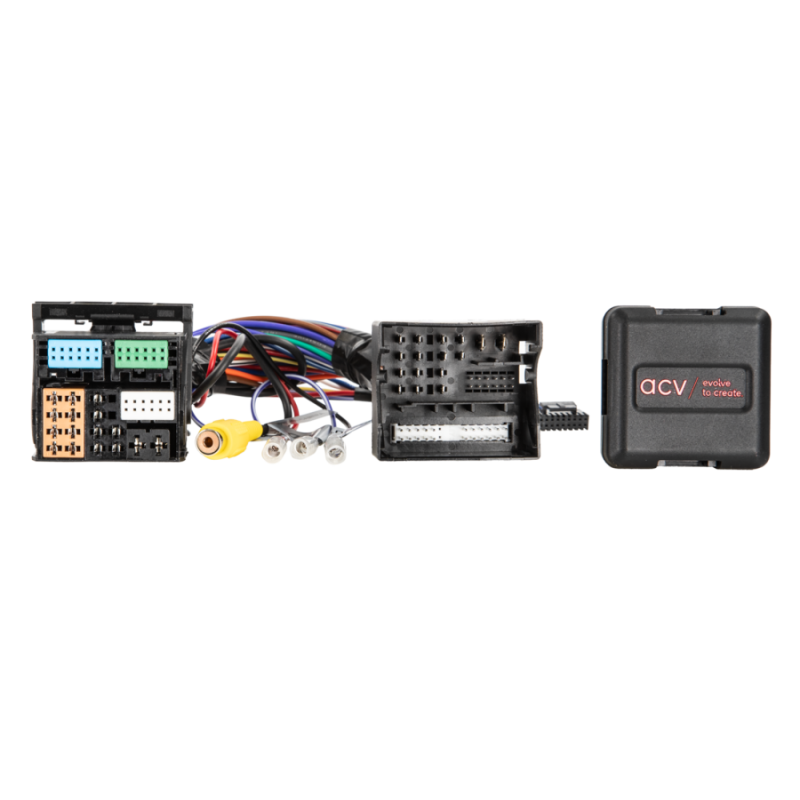

ACV 771324-1038-1
Your shopping cart is empty!
SEAT
| Model | Years |
|---|---|
| Alhambra | 2016–2021 |
| Arona | 2018–2021 |
| Ateca | 2017–2021 |
| Ibiza | 2015–2017 |
| Ibiza | 2017–2021 |
| Leon | 2013–2020 |
| Toledo | 2016–2019 |
Skoda
| Model | Years |
|---|---|
| Fabia | 2014–2021 |
| Karoq | 2018–2021 |
| Kodiaq | 2017–2021 |
| Octavia | 2012–2020 |
| Rapid | 2016–2019 |
| Superb | 2015–2020 |
| Yeti | 2015–2017 |
Volkswagen
| Model | Years |
|---|---|
| Amarok * | 2017–2021 |
| Arteon * | 2018–2021 |
| Beetle * | 2015–2019 |
| Caddy * | 2016–2021 |
| Caravelle * | 2015–2019 |
| Crafter * | 2017–2021 |
| Golf * | 2012–2020 |
| Golf Sportsvan * | 2014–2020 |
| Multivan * | 2015–2019 |
| Passat * | 2016–2021 |
| Polo * | 2014–2017 |
| Polo * | 2018–2021 |
| Scirocco * | 2016–2017 |
| Sharan * | 2016–2021 |
| T-Cross * | 2019–2021 |
| T-Roc * | 2018–2021 |
| Tiguan * | 2016–2021 |
| Touran * | 2016–2021 |
| Transporter * | 2015 |
| Transporter * | 2019–2021 |
Marked models: see conditions in the product description
Product Description
771324-1038-1, Rear view camera interface Seat/Skoda/VW MIB/MIB2, ACV
Rear View Camera Interface
Seat/Skoda/VW MIB/MIB2
This interface enables the supply of a rear view cam to a factory-infotainment system
Plug and Play interface
Rear-view camera integration to the factory infotainment
Rear-view camera input (only for NTSC cameras)
Automatic switching to after-market camera when reverse gear is engaged (coding of vehicle is required)
Power supply output for rear-view camera (max. 180mA)
Note:
vehicles with factory OPS (optical parking distance system)
different VW Composition Media HU are not compatible*
vehicle must be coded by diagnosis computer to rear-view camera (look into the manual)
vehicle must be coded bevor installation camera and interface
power supply rear-view camera form interface necessary (look into the manual)
For OEM HU:
Seat
MIB STD2 PQ/+NAV
Media System Plus
1x SD vertical left or 2x SD vertical left + right and disc drive above 6.33 inch monitor
MIB/MIB2 High/Standard
Navigationssystem Plus
Media System Plus
6.5 Zoll oder 8 Zoll Monitor
Skoda
MIB STD2 PQ +/NAV
Bolero
Amundsen
1x SD vertical left or 2x SD vertical left + right and disc drive above 6.33 inch monitor
MIB/MIB2
High/Columbus
Standard Bolero
Standard Amundsen
5.8inch, 6.5inch or 8inch monitor
VW
MIB STD2 PQ/+NAV
Composition Media
Discover Media
1x SD vertical left or 2x SD vertical left + right and disc drive above 6.33 inch monitor
MIB/MIB2
High/Discovery Pro
Standard Composition Media*
5.8 inch, 6.5 inch, 8 inch or 9.2 inch Monitor
VW T6 2015 - 2015 - 2019
* not compatible to Composition Media with part numbers:
3Q0035812
3Q0035819, 3Q0035819A, 3Q0035819B, 3Q0035819C
3Q0035820, 3Q0035820A, 3Q0035820B, 3Q0035820C
5G0035812
5G0035819, 5G0035819A, 5G0035819B, 5G0035819C
5G0035820, 5G0035820A, 5G0035820B, 5G0035820C
The letter at the end is merely the software version of the head-unit
newer versions are likely to not be compatible as well.
Only the last 6 digits/numbersare relevant.
The part number of the head-unit can be displayed on the monitor:
Menu button->Setup->System-Information->part number device
Technical Data, Signals, Connections and Can-Bus
- Rear view camera input (NTSC cameras only)
- Power supply output for rear view camera (max. 180mA)
Installation Instructions
- Automatic switching to retrofit rear view camera input when reverse gear is engaged (vehicle coding required)
- Perform coding before installing the camera and interface
- Power supply for rear view camera via the interface required (see user manual)
Important Notes
- Vehicles with OEM-OPS (optical parking system)
- Various VW Composite Media devices not compatible
- Coding of the factory system to rear view camera required (see user manual)
- Not compatible with Composition Media with the following part numbers: 3Q0035812, 3Q0035819, 3Q0035819A, 3Q0035819B, 3Q0035819C, 3Q0035820, 3Q0035820A, 3Q0035820B, 3Q0035820C, 5G0035812, 5G0035819, 5G0035819A, 5G0035819B, 5G0035819C, 5G0035820, 5G0035820A, 5G0035820B, 5G0035820C
- The letter at the end only indicates the software version of the head unit. Newer versions may also not be compatible.
- Only the last 6 digits of the part numbers are decisive.
- The part number of the device can be displayed on the screen: Menu button->Setup->System Information->Device part number